I fixed the lag in my AI agent!

Previously in godo (my old TUI), I was initially using an array to store AI responses and user input.
This worked well until I added streaming for the responses.
My first approach was to modify the array 💀 while streaming.
So the flow was: when a new chunk arrives, check if we're already streaming... if so, modify the last element of the array and render the output by looping through the array.
This worked fine until the model started hallucinating too frequently, and the array became a huge freight train (of re-renders).
To fix this my dumb brain found a new approach 😊
Instead of keeping everything in array keep all in a big string.

This is much faster than the big array approach because I was using a StringBuilder this time.
Strings are immutable, which means you can't modify a string in place. When you do:
str += newContent
this won't modify str...
instead, it'll create a bunch of copies, which is inefficient and creates extra headache for the garbage collector.
But StringBuilder is a mutable object which handles string concatenation efficiently.
It handles an internal buffer and appends the new value to it.
It was better as long as you're handling simple chat.
But when I implemented thinking and tool calling, it got messier, buggy and inaccurate across multiple events.
Now the TUI isn't that laggy anymore, but it's pretty buggy 😂. Even though you won't normally notice it, it's too much of a headache to handle.
Also, for each text segment we need to apply different styles.
For example, if the agent is thinking, it should be in a muted color; if it's performing a function call, that should be in a different color.
If we write the output directly to the builder, we end up getting text like:
<SomeColorStyle>message-chunk<SomeColorStyle>
This makes the string unnecessarily bigger.
What we need instead is:
<ThinkingColorStyle>{the whole thinking block ...}<ThinkingColorStyle>
To handle this, I added a StringBuilder for the current thinking content, plus a bunch of variables to handle events like: when the agent started thinking, when it ended, when it's responding, when it's calling a tool, when the tool call result arrives... and more shit.
But this time, I've applied a new approach in my new AI agent TUI (bai)
the simple approach that fixed the old issues I was having in godo.
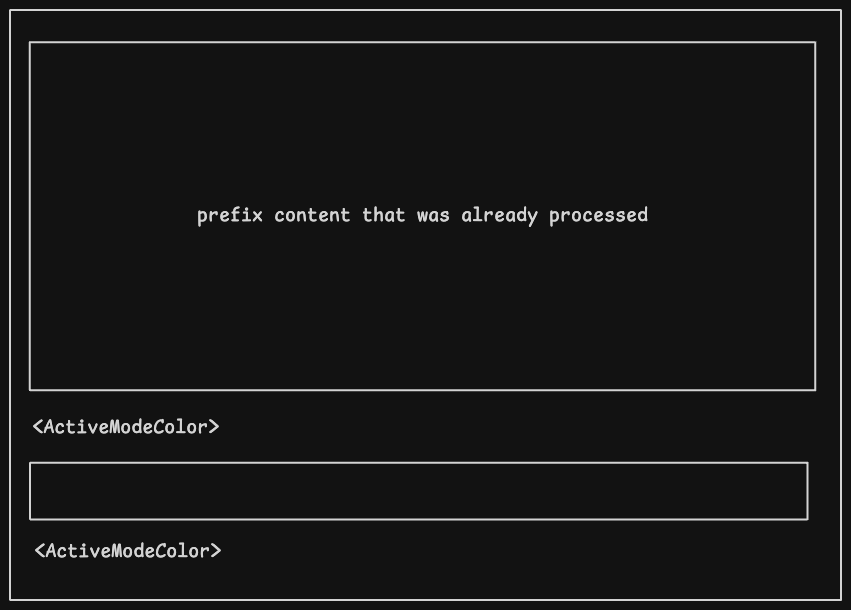
We should change what the last thing we were doing (But not like the first one).
In this approach, I combined both the string and the array.
Instead of a bunch of variables, I kept one field that holds the active mode
If you dont understand Golang, don't worry stay with me!
Now we don't need to use multiple varibles.
When the agent fires a "thinking" event, we pass the event type (which is thinking in this example) and the text to a function/method.
In the function, we check if the event type is the same as the old one. If it's the same, that means the model is still thinking, just like before, so we keep the text in active's buf variable, which is a StringBuilder.
If the event type is not the same as the old one, that means this is a totally new event, it could be thinking → normal responding, or a user message itself.
For that, we have to change the active event type to the given (new) event type, and reset the buf.
If the event type is different, that means the old event has already been handled/completed.
So before we reset, we need to store the old data in a variable:
Before resetting, just keep the old active buf content by prefixing it (appending it to rendered):
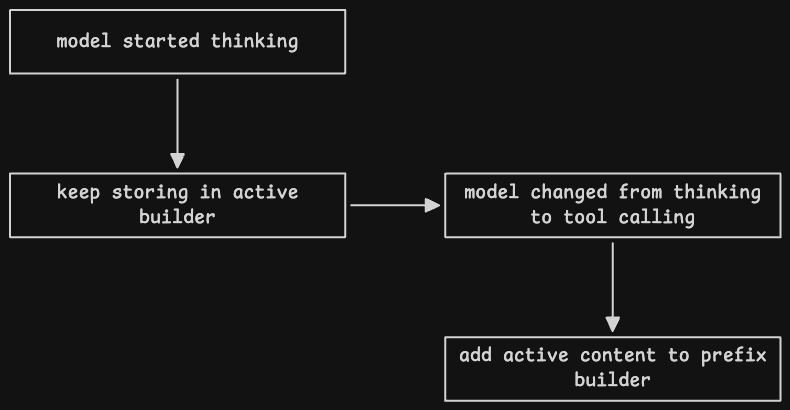
Now styling is easy peasy:
Styling wraps the whole block instead of wrapping each chunk.
Now, while rendering the content, we just add the prefix and the active buf, and that's it 👀
You might notice that we're passing the width of the terminal into renderSegment, and later we're storing the styled output in the rendered builder too. But the terminal width can change...
the user might resize their terminal
or maybe they split their terminal to use Claude Code. I don't want my TUI to break because of that.
That's why I'm storing the active segment in a slice before flushing
you can think slice in go as a dynamic array
I'm using the slice to store all the completed segments
And when the user resizes their terminal, we loop through the blocks, apply the style (with the current width), and just replace the rendered builder's content 😎
The code I showed here is just a starting point, and it'll change over time.
If you have any better approaches, comment them down 🙂, or send a PR 😁
Thanks for reading... ❤️
Bad programmers worry about the code, Good programmers worry about data structures and their relationships.
-- Linus Torvalds